Why a Ring camera for renters lives or dies on wiring
For a Ring camera for renters, the first decision is always power. A wired cam can feel tempting because it promises unlimited power and continuous video, yet for most tenants the existing doorbell wiring is either off limits or mysteriously dead behind the plaster. Battery powered Ring products avoid that problem entirely, which is why they dominate real world reviews from renters who cannot touch the building’s electrical system.
Think about your own door and hallway before you even open an Amazon page. If your landlord forbids drilling near the doorbells in the lobby, a wired doorbell or any ring wired setup is effectively impossible, no matter how good the marketing sounds. In that case a battery doorbell or a compact indoor cam placed behind a window gives you video coverage with zero risk to your deposit, even if the view is slightly compromised by glass reflections at night.
Wired Ring doorbell models such as the Ring Wired Video Doorbell and the Ring Doorbell Pro series are better suited to owners who can open walls. Renters usually get more value from a battery Ring doorbell or a Stick Up Cam Battery, because these devices mount with adhesive or tension brackets and rely on a removable ring battery pack. That single design choice — wired versus battery — shapes everything from where you can place the cam to how often you must think about power and charging routines.
Wireless Ring options that stay renter friendly and truly portable
For a budget conscious renter, the most flexible Ring camera for renters is usually the Stick Up Cam Battery. This battery powered cam can sit on a bookshelf, clamp to a balcony rail with a third party tension mount, or attach to a wall using removable strips that will not scar the paint on a white hallway. Because it is a fully wireless product, you can shift the cam from the front door to the living room in minutes when your security priorities change.
The Ring Indoor Cam plays a different role, acting as a tiny wired cam that plugs into any power outlet and watches the inside of your flat. On a shelf, the indoor cam gives a wide view of the room, but mounting it higher with non permanent hardware improves head to toe framing of anyone entering through the door. If you want to compare battery life and night vision performance with other wireless security systems, a detailed smart security camera test of a two year battery outdoor system is available in this wireless smart security camera review, which helps put Ring’s real time live view features into context.
For doors in shared corridors, the Ring Peephole Cam is often the most renter friendly Ring doorbell option. It replaces the existing peephole in the door without new holes, giving you doorbell video, motion detection alerts, and two way audio without touching communal wiring or shared doorbells. Because the peephole cam runs on a compact ring battery, you can remove the whole pack and camera when you move out, leaving only the original peephole glass behind.
Wired vs wireless Ring power: what really matters in a rental
Choosing between a wired doorbell and a battery doorbell is less about specs and more about control over the property. A wired Ring doorbell like the Ring Wired Video Doorbell draws constant power from existing doorbell wiring, which sounds ideal until you realise many rental door circuits are undocumented, shared, or simply broken. Battery Ring doorbells and battery powered cams avoid that uncertainty, trading unlimited power for predictable charging cycles that you can manage on your own schedule.
In practice, a typical ring battery pack on a Stick Up Cam Battery or a battery doorbell lasts one to three months, depending on motion detection settings, Wi Fi strength, and how often you use live view. Heavy use of real time video and frequent motion alerts near a busy door will drain the battery faster, so renters in apartment blocks should expect shorter intervals than those in quiet suburban units. To stay ahead, many renters keep a second battery pack charged, swapping it in seconds so the cam or doorbell ring never goes offline while the first pack sits on the charger.
Wired options still have a place when you legally can use them, especially for an indoor cam that plugs into a convenient power outlet and never needs a ladder for battery changes. If you are weighing the long term tradeoffs between wired and battery power for every Ring cam in your setup, a deeper breakdown of the power decision is available in this battery or wired Ring installation guide. For renters, the pattern is clear though, because wireless Ring products minimise arguments with landlords, simplify move out day, and let your entire security pack travel with you to the next flat.
Mounting, Wi Fi, and daily use in real rental buildings
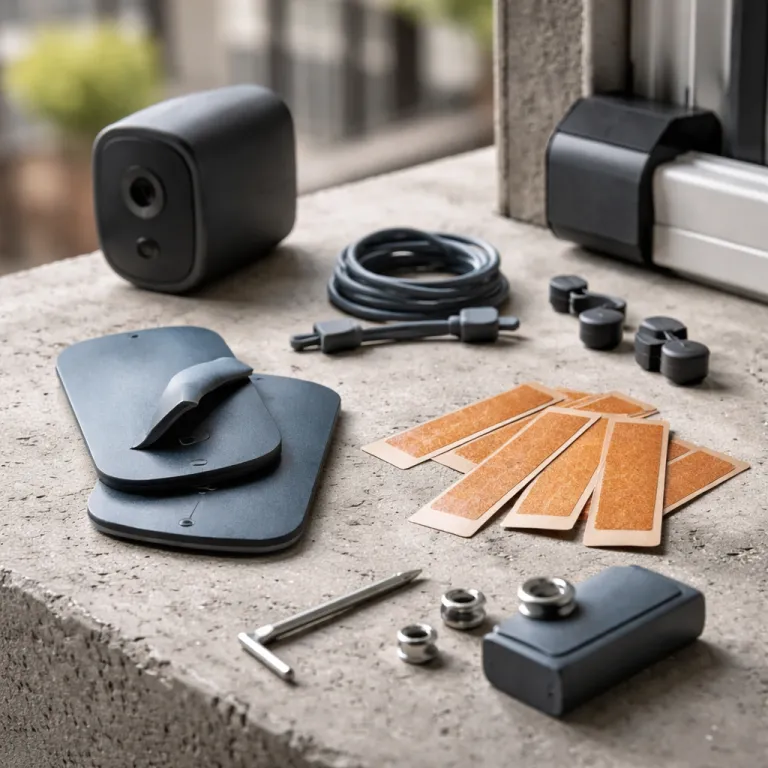
Mounting a Ring camera for renters is mostly about avoiding permanent scars on the door or walls. Command style strips rated for 5 to 15 kilograms per strip can safely hold most Ring cams, including the Stick Up Cam Battery and smaller video doorbells, as long as you clean the surface and follow the curing time. For doors where you cannot touch the paint at all, tension mounts that grip the top of the door or peephole mounts that use the existing hole keep the product secure without a single screw.
Wi Fi is the next constraint, because many apartment buildings have thick walls and crowded 2,4 gigahertz bands that can break live view or delay motion alerts. If your Ring cam keeps dropping the network, a compact plug in Wi Fi extender that does not need Ethernet can stabilise the connection, and a detailed explanation of the 2,4 gigahertz fix is available in this Ring Wi Fi troubleshooting guide. Place the extender roughly halfway between your router and the door, then test real time video from the hallway to confirm that motion detection events reach your phone without lag.
Daily use comes down to habits rather than hardware, especially when you juggle multiple cams and doorbells in a small space. Set motion zones tightly around your actual door area to avoid constant alerts from neighbours passing by, and use the Ring app’s snooze tools when you expect deliveries or guests. Over time you will find a balance where your security system feels smart and responsive without turning every corridor footstep into a notification, and that balance is what makes a renter friendly Ring setup sustainable.
Move out strategy and model picks that respect your deposit
When you eventually move, a well planned Ring camera for renters setup should pack into a single shoebox. Before you unscrew anything, open the Ring app, stop recording, and download any important video clips you want to save from your account. Then factory reset each cam and doorbell ring so the next tenant or landlord cannot access your live view history or motion detection settings.
Physically, remove every battery pack, unplug any wired indoor cam, and gently detach adhesive mounts by pulling the tabs straight down to avoid tearing paint from a white wall. Restore the original peephole if you used a Peephole Cam, and reattach any standard doorbell button if you temporarily replaced it with a Ring doorbell or another video doorbell. Keep all small parts — wedges, corner kits, compatible Ring screws, and chime units — in labelled bags so your full security pack is ready for the next flat without hunting for missing pieces.
For renters who want specific model guidance, the Ring Peephole Cam and the Stick Up Cam Battery form a strong baseline, with an optional Indoor Cam watching valuables from a shelf. These products give you night vision, two way audio, and clear color video without permanent wiring, and they all qualify as renter friendly because they install and uninstall cleanly. When you shop, ignore the “best seller” and “doorbell newest model” badges on Amazon and instead focus on whether the field of view covers your actual door from head to toe, because what matters at 2 a.m. is not the megapixel count, but the view from your porch at 2 a.m.
FAQ
Can I install a Ring doorbell in a rental without drilling
Yes, many renters install a Ring doorbell without drilling by using adhesive mounts, tension brackets, or a Peephole Cam that replaces the existing peephole in the door. These solutions keep the installation renter friendly because they avoid new holes in walls or frames. Always confirm with your landlord or lease agreement that non permanent mounts on the door are allowed.
How often will I need to charge a Ring battery in an apartment
In a typical apartment corridor, a Ring battery in a Stick Up Cam Battery or battery doorbell lasts one to three months. High motion areas with constant foot traffic and frequent live view checks shorten that interval, while quiet hallways extend it. Keeping a second charged battery pack ready lets you swap power in seconds without leaving your security cam offline.
Is wired better than wireless for Ring cameras if I am renting
Wired Ring cameras offer unlimited power and can support continuous video, but they depend on existing doorbell wiring and landlord permission to modify it. Wireless battery models are usually better for renters because they avoid electrical work and can move with you to the next property. If you have reliable wiring and written approval, a wired indoor cam can still be a good choice for rooms where an outlet is always available.
Will a Ring camera work with shared building Wi Fi
A Ring camera can work on shared building Wi Fi as long as the network allows connected devices and provides a stable 2,4 gigahertz signal. Some managed networks block peer to peer traffic or device registration, which can prevent setup, so you may need your own router and internet line for full control. If signal strength near the door is weak, a plug in Wi Fi extender placed in your flat can significantly improve live view reliability.
What should I do with my Ring account and devices when I move out
Before moving, download any important video clips you want to keep, then remove each Ring device from your account in the app. Perform a factory reset on every cam and doorbell so no personal data or Wi Fi credentials remain on the hardware. Finally, pack all mounts, screws, and battery packs together so your complete Ring security pack is ready for installation at your next rental.