

Understanding the basics of pan tilt zoom cameras
What Makes PTZ Cameras Stand Out in Home Security
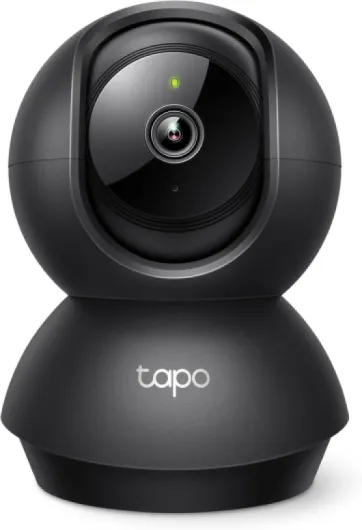
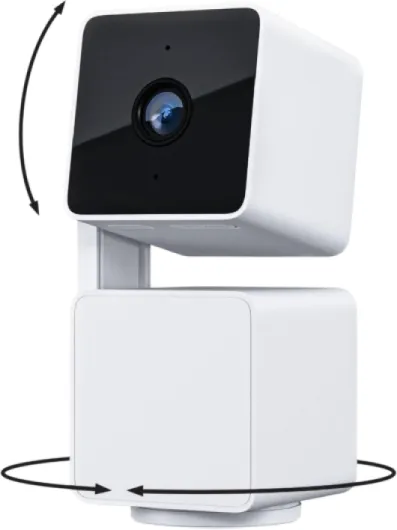
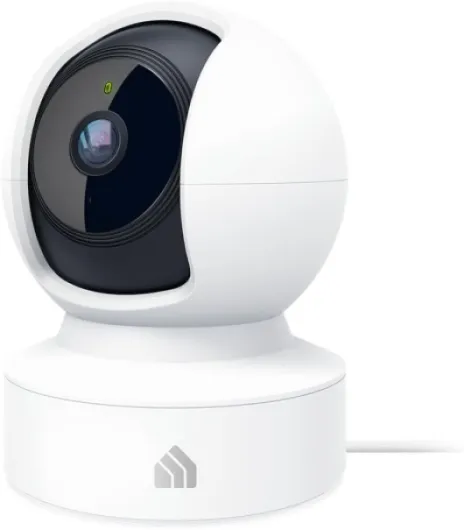
When it comes to modern home security, PTZ cameras—short for pan tilt zoom cameras—offer a dynamic upgrade over traditional fixed security cameras. Unlike standard models, PTZ security cameras can move horizontally (pan), vertically (tilt), and zoom in or out, giving you a flexible field of view and the ability to track activity in real time. This makes them a smart choice for anyone looking to enhance their surveillance system with advanced features like auto tracking and remote control.
- Pan: Move the camera left or right to cover wide areas.
- Tilt: Adjust the camera up or down for better vertical coverage.
- Zoom: Use optical zoom to focus on details without losing video quality.
PTZ cameras are designed for live streaming and real-time monitoring, making it easy to keep an eye on your property from anywhere. Many models offer night vision, motion detection, and even smart tracking, which automatically follows movement across the camera’s field of view. These features help you respond quickly to potential threats and provide peace of mind, whether you’re at home or away.
Compared to regular security cameras, PTZ cameras provide more coverage with fewer devices, which can be cost-effective in the long run. They are also compatible with most home security systems, including Ring, and can be integrated for seamless operation. If you’re interested in learning how to secure your property with security cameras without WiFi, check out this guide to non-WiFi security camera solutions for more options.
Whether you’re looking for a camera with a sale price or a premium model at regular price, PTZ cameras offer a range of features to fit different needs. Their ability to provide live, high-quality video and easy remote control makes them a strong addition to any home surveillance setup.
Key features to look for in a pan tilt zoom camera
Essential Capabilities for Modern PTZ Security Cameras
When choosing a pan tilt zoom (PTZ) camera for your home security system, it’s important to focus on features that truly enhance surveillance and make daily use easy. PTZ cameras stand out from regular security cameras by offering flexible movement and advanced tracking, but not all models are created equal. Here are the key features to consider:
- Optical Zoom: Look for a camera with a strong optical zoom, not just digital zoom. Optical zoom lets you get a closer, clearer view of details in real time without losing video quality. This is especially useful for identifying faces or license plates from a distance.
- Wide Field of View: A broad field view ensures you can cover more area with a single camera. Combined with pan and tilt functions, this means fewer cameras are needed for complete coverage.
- Remote Control and Live Streaming: The ability to control your PTZ camera remotely and view live video from your phone or computer is essential for modern security systems. This makes it easy to check in on your property anytime, from anywhere.
- Auto Tracking and Motion Detection: Smart tracking features allow the camera to follow movement automatically. Motion detection helps the system alert you when something unusual happens, improving the effectiveness of your surveillance.
- Night Vision: Good night vision is a must for 24/7 security. Look for PTZ cameras with infrared or low-light capabilities to ensure clear video even in complete darkness.
- Easy Integration: Make sure the camera is compatible with your existing security system and supports integration with smart home platforms. This will help you manage all your security cameras from one interface.
- Build Quality and Weather Resistance: For outdoor use, check the camera’s durability and weatherproof rating. A robust design ensures reliable operation in all conditions.
- Power Options: Some PTZ cameras support Ethernet-powered connections, which can simplify installation and improve reliability. Learn more about how Ethernet-powered CCTV enhances your home security for additional insights.
- Value for Money: Compare sale price and regular price to ensure you’re getting the best deal for the features offered. Sometimes, a higher upfront cost is justified by advanced capabilities and longer lifespan.
By focusing on these features, you’ll be better equipped to choose a PTZ security camera that fits your needs and integrates smoothly with your system. The right camera will provide reliable surveillance, easy control, and peace of mind for your home.

- + 360° pan coverage
- + HD video quality
- + Two-Way Talk feature
- + Compact design

Integrating a pan tilt zoom camera with your Ring system
Connecting PTZ Cameras to Your Ring Security System
Integrating a pan tilt zoom (PTZ) camera with your Ring system can significantly enhance your home security by expanding your field of view and enabling real time surveillance. PTZ cameras offer remote control over pan, tilt, and zoom functions, allowing you to monitor different areas of your property without needing multiple security cameras.
- Compatibility: Before adding a PTZ camera, check if your Ring system supports third-party cameras or if you need a Ring-branded PTZ model. Some systems may require specific firmware or app updates for seamless integration.
- Network Setup: PTZ cameras often rely on your home Wi-Fi or wired network. Make sure your network is stable and has enough bandwidth for live streaming and video recording. Understanding your camera's IP address is crucial for setup and troubleshooting. For more on this, see understanding the IP of your Ring camera.
- App Integration: Most modern Ring systems allow you to add new devices through the Ring app. Once your PTZ camera is connected, you can control pan, tilt, and zoom functions directly from your smartphone or tablet. This makes it easy to adjust your view in real time and track motion as it happens.
- Smart Features: Many PTZ cameras offer advanced features like motion detection, auto tracking, night vision, and optical zoom. These tools help your Ring system deliver more comprehensive surveillance, alerting you to unusual activity and providing clear video footage even in low light.
- Multiple Camera Management: If you have several cameras, the Ring app lets you switch between live feeds, set custom motion zones, and review recorded events. This centralized control helps you manage your security system efficiently.
By integrating PTZ cameras with your Ring system, you gain flexibility and improved coverage. Whether you’re monitoring your driveway, backyard, or entryways, the combination of pan, tilt, and zoom capabilities with Ring’s smart security features ensures you have a reliable, easy-to-use surveillance solution.
Installation tips for optimal coverage
Positioning Your PTZ Camera for Maximum Coverage
Getting the most out of your pan tilt zoom (PTZ) camera starts with smart placement. PTZ cameras offer a flexible field view, but their effectiveness depends on where you install them. Place your camera high enough to avoid tampering, but low enough to capture clear video of faces and license plates. Corners of your property or above entry points are popular spots for security cameras, as they provide a wide surveillance area and help with motion detection.
Optimizing Angles and Settings
Take advantage of the pan, tilt, and zoom features to cover blind spots. Adjust the tilt security settings to monitor both ground level and higher areas, and use the optical zoom to focus on distant objects without losing video quality. PTZ cameras with auto tracking can follow movement in real time, making them ideal for monitoring large spaces. Make sure to test your camera’s live streaming and tracking functions after installation to ensure you have the best view possible.
Integrating with Your Security System
For seamless operation, connect your PTZ camera to your existing security system. Many smart cameras are compatible with Ring systems, allowing you to control pan, tilt, and zoom remotely from your mobile device. This integration makes it easy to monitor your property, receive motion alerts, and access live video feeds at any time. If your system supports it, enable night vision for round-the-clock surveillance.
Installation Tips for a Smooth Setup
- Check your Wi-Fi or wired connection to ensure stable live streaming.
- Secure the camera mount firmly to prevent vibrations that can affect video quality.
- Follow the manufacturer’s instructions for connecting power and data cables.
- Test the remote control features, including pan, tilt, and zoom, after installation.
- Adjust motion detection zones to minimize false alerts from passing cars or animals.
Maintaining Your PTZ Security Camera
Regularly clean the camera lens to maintain clear video quality. Check for firmware updates to keep your system secure and take advantage of new features. If you notice any issues with tracking or live streaming, consult the troubleshooting section of your camera’s manual or your security system’s support resources. Keeping your PTZ camera in top condition ensures reliable surveillance and peace of mind.
Privacy considerations and data security
Protecting Your Privacy with PTZ Cameras
When adding a pan tilt zoom (PTZ) camera to your home security system, privacy and data security are essential considerations. PTZ cameras offer advanced features like optical zoom, auto tracking, and real time live streaming, but these same capabilities can raise concerns about who can access your video and how your footage is stored.- Data Encryption: Choose security cameras and systems that use end-to-end encryption. This ensures that your video feeds are protected from unauthorized access, both in transit and when stored in the cloud.
- User Access Controls: Set up strong passwords and enable two-factor authentication for your camera system. Limit access to only trusted users and regularly review who has permission to view or control your PTZ camera.
- Privacy Zones: Many PTZ cameras allow you to set privacy zones. These are areas within the camera’s field view that are blocked from recording, helping to respect the privacy of neighbors or shared spaces.
- Firmware Updates: Keep your cameras and security systems updated with the latest firmware. Manufacturers often release updates to patch security vulnerabilities and improve privacy features.
- Cloud vs. Local Storage: Decide whether you want your video footage stored in the cloud or on a local device. Cloud storage is convenient for live streaming and remote control, but local storage can offer more control over your data.
Responsible Use of Advanced Surveillance Features
PTZ security cameras come with powerful features like motion detection, night vision, and auto tracking. While these enhance security, it’s important to use them responsibly:- Inform household members and visitors about the presence of cameras ptz and the areas under surveillance.
- Regularly review your camera’s settings to ensure you’re not unintentionally recording private areas or capturing more than necessary.
- Check local laws regarding video surveillance and audio recording. Some regions have strict regulations about where cameras can be placed and what can be recorded.
Securing Your PTZ Camera System
A secure PTZ camera system is not just about technology but also about good habits:- Change default passwords on all security cameras and connected devices.
- Monitor your system for unusual activity, such as unexpected logins or changes to settings.
- Consider professional installation for complex systems to ensure optimal privacy and security.
Troubleshooting common issues with pan tilt zoom cameras
Resolving Common PTZ Camera Challenges
PTZ cameras are powerful tools for home security, but like any smart technology, they can face issues that affect performance. Here are some practical solutions to help you get the most from your pan tilt zoom camera system.- Connection Drops or Video Lag: If your live streaming video is choppy or disconnects, check your Wi-Fi signal strength near the camera. PTZ cameras need a stable connection for real time tracking and remote control. Consider moving your router closer or using a Wi-Fi extender for better coverage.
- Motion Detection Not Working: Make sure motion detection is enabled in your security camera’s settings. Adjust the sensitivity if your system is missing events or sending too many alerts. Sometimes, a simple firmware update can resolve these issues.
- Camera Not Responding to Pan, Tilt, or Zoom: If the camera won’t move as expected, restart the device and check for obstructions around the tilt security mechanism. For cameras with optical zoom, ensure the lens is clean and free from debris.
- Night Vision Problems: PTZ security cameras rely on infrared for clear night vision. If the image is too dark, check for objects blocking the infrared LEDs. Cleaning the lens and adjusting the field view can also help improve clarity.
- Auto Tracking Not Accurate: Auto tracking features in cameras PTZ series may need calibration. Review your camera’s tracking settings and make sure the area is well lit. Sometimes, reflective surfaces can confuse the tracking system.
- Integration Issues with Security Systems: If your PTZ camera isn’t syncing with your existing security systems, verify compatibility and update both devices’ software. Double check your network settings and ensure all devices are on the same network for seamless integration.
- Remote Control Delays: Delays in remote control commands can be caused by network congestion. Try reducing the number of devices using your Wi-Fi during critical surveillance times.