
Summary
Editor's rating
Value for money: where it makes sense and where it doesn’t
Chunky little dome that blends in but isn’t tiny
Power and connectivity: no battery, so placement matters
Build quality and long-term feel
Image quality, tracking and night vision: where it actually stands out
What this camera actually does in real life
As a pet cam, baby monitor and security cam – does it actually help?
Pros
- Very clear 4K image with useful 8× hybrid zoom and dual-lens split view
- No subscription required thanks to microSD and HomeBase S380 local storage options
- Effective pan/tilt and AI tracking for pets and people with decent night vision
Cons
- Mains powered only and Wi‑Fi only, so placement and network quality matter
- App and motion settings need tweaking; can be noisy with alerts out of the box
- Not ideal as a primary outdoor/driveway camera, especially behind glass with IR

Specifications
View full product page →| Brand | eufy Security |
4K indoor cam that actually feels useful day to day
I’ve been using the Eufy Security Indoor Cam S350 at home mainly as a pet cam and general indoor security camera. I also tested it a few evenings as a baby monitor in the nursery. I already own a couple of cheaper 1080p indoor cams from other brands, and one older Eufy cam, so I wasn’t expecting to be blown away by yet another little plastic dome. But this one does bring a few practical upgrades that you actually notice in daily use, not just on the spec sheet.
The two things that stood out to me right away were the 4K clarity and the pan/tilt + tracking. Being able to see a whole room and then zoom in on a pet or a small object without the image turning into a total blur is honestly the main reason this camera feels a bit more “serious” than the budget stuff. I can see my dog’s expression from across the room and actually read small labels or objects on a table.
What also matters, and what pushed me to try this one, is the no-subscription approach. I’m tired of paying monthly fees just to see recorded clips. Here you put in a microSD card or connect it to a HomeBase S380 and you’re done. I’ve been running it with a microSD for now and it covers my needs for motion-triggered clips without extra costs.
It’s not perfect though. The app has a lot of options and it’s a bit messy at first, the tracking can be too enthusiastic, and if you want true 24/7 coverage with multiple Eufy devices, you quickly end up thinking about an SSD for the HomeBase, which is extra money. Overall, after using it every day for a couple of weeks, I’d say it’s a pretty solid indoor camera if you care about image quality and don’t want a subscription, but it’s not the magic answer to every home security problem.
Value for money: where it makes sense and where it doesn’t
In terms of value, the S350 sits in that mid-range zone where it’s clearly more expensive than basic 1080p indoor cams, but cheaper than some high-end multi-camera systems or subscription-heavy brands. What helps its case is the no-subscription model. Once you buy the camera and a microSD card, you’re basically done. If you compare that with some competitors that lock key features behind a monthly fee, the S350 becomes more attractive over time, especially if you plan to keep it running for years.
The question is: do you really need 4K, dual lenses, and tracking? If you just want to occasionally peek at your cat on the sofa, a basic 1080p cam for half the price might be enough. Where I think the S350 justifies its cost is if you want to use it for multiple roles: pet cam, baby monitor, and a general indoor security cam. In that case, the better image quality, AI detection, and pan/tilt make a real difference. Being able to see more and zoom in clearly is not just a luxury; it can be the difference between recognizing a face or a license plate and just seeing a blob.
There are some hidden costs if you go deeper into the Eufy ecosystem. If you want 24/7 recording and multiple cameras, you’ll probably end up buying a HomeBase S380 and a decent SSD, which adds up. Also, there’s no HomeKit support at the moment and no RTSP yet (they say it’s coming later), so if you’re heavily into home automation and want everything in one system, that’s a limitation you should know about before buying.
Overall, I’d say the S350 offers good value for money if you specifically want high resolution, pan/tilt, and local storage without a subscription. If you’re just after the cheapest way to watch a room, it’s overkill. But if you care about detail and you’re tired of monthly fees, it’s a solid middle ground between basic budget cams and expensive cloud-locked systems.
Chunky little dome that blends in but isn’t tiny
Design-wise, the S350 is a small dome camera, off-white, that looks fairly neutral. It’s not ugly, but it’s not some designer object either. It’s about 6.5 x 8 x 10.4 cm, so it’s compact enough to sit on a shelf or window ledge without dominating the room, but it’s definitely a bit bulkier than the very slim stick-style indoor cams. The dome shape is practical for pan/tilt, but if you wanted something super discreet, this is a bit more obvious.
The camera head rotates smoothly left and right and tilts up and down. The motor noise is very low; in a quiet room at night you can hear a faint whirr if you listen for it, but it’s not loud enough to wake a sleeping baby or scare a pet. I tried moving it around while my dog was sleeping and he didn’t react at all. For a nursery, that’s important; some cheaper PTZ cams sound like a tiny robot turning around and that gets annoying fast.
On the back you’ve got the power port and the microSD slot is hidden underneath, which is good so kids or pets can’t easily mess with it. There’s no battery inside; it’s mains powered only, so you need a socket nearby or an extension. That’s fine for indoor use but it does limit placement a bit. I ended up moving a lamp to free a plug in the living room. There’s also no Ethernet port – it’s Wi‑Fi only, which is okay for most people but worth noting if you prefer wired connections.
One thing to know: by default, there are status LEDs that can be a bit bright in a dark room, but you can tweak or disable them in the app. For window use, you’ll also want to turn off the infrared lights, otherwise they just reflect on the glass. Overall, the design is functional and fairly discreet, but not ultra-compact. It looks like what it is: a home camera, not a piece of decor.
Power and connectivity: no battery, so placement matters
There’s no built-in battery in the S350, so it’s 100% dependent on mains power. For some people that’s fine, for others it’s a bit limiting. In my case, it meant I couldn’t just throw it anywhere in the room – I had to think about where the sockets were. In the living room I ended up using an extension strip behind the TV stand to power both the camera and some other gear. In the nursery, I placed it on a high shelf near a socket and ran the cable neatly along the wall. The cable length is okay for most rooms, but if your sockets are all low and you want the camera high up, you may need a longer cable or a different layout.
The upside of no battery is that you don’t have to think about charging. My previous battery-powered doorbell from another brand constantly needed recharging and would miss events when the battery was low. With this one, once it’s plugged in, it just runs. For a static indoor camera, I actually prefer that. You just have to accept that it’s not made to be moved around all the time. If you want to occasionally relocate it (living room during the day, nursery at night), be ready to re-route cables or accept a more temporary, slightly ugly cable setup.
On the connectivity side, it supports 2.4 GHz and 5 GHz Wi‑Fi, which helps a lot with stability. I put it on my 5 GHz network and the stream is smoother than my older 2.4 GHz-only cams. There’s no Ethernet port though, so if your Wi‑Fi is bad, you’re stuck. Range-wise, I had no dropouts in a medium-sized flat with the router in the hallway and the camera in the living room. When I tried it further away behind a window near the front door, the signal was a bit weaker but still usable.
So, on the power and connectivity front: no battery means more reliable but less flexible, and Wi‑Fi only is fine for most homes but not for those who want wired connections. It’s something to think about before buying, especially if you had in mind to move the camera from room to room all the time.
Build quality and long-term feel
In terms of build, the S350 feels light but not cheap. The plastic doesn’t creak when you twist it a bit and the pan/tilt mechanism feels smooth. I’ve been rotating it a lot in the app, testing tracking and manually panning around, and it hasn’t shown any wobble or grinding. It’s clearly made to move often. The base is stable enough on a flat surface; my dog bumped the TV stand once and the camera shook but didn’t tip over. If you have very active kids or pets, I’d still consider fixing it more securely or putting it out of reach.
It’s officially an indoor camera, but the spec sheet mentions IP67 which is more of an outdoor rating. Personally, I wouldn’t trust it outside permanently because of power and mounting, but for a covered balcony or behind a window it’s fine. I used it behind a window several nights in a row with IR off and it handled temperature changes from heating on/off without any issues like fogging or weird behavior. The casing never got more than slightly warm, even after long recording sessions.
Long-term, the part that will probably matter most is the motor and the moving parts. That’s always the weak spot on PTZ cameras. I obviously haven’t used it for years yet, but based on the feel, it doesn’t give off that fragile vibe you get from super cheap models where the head feels loose from day one. The Eufy brand also tends to push firmware updates, which is good and bad: you get new features and fixes, but you’re also hoping they don’t break things. So far, the firmware on mine has been stable.
Overall, I’d rate the durability as pretty solid for the price range. It doesn’t feel like a tank, but it also doesn’t feel like it’s going to fall apart after three months. Just remember it’s not meant to be thrown around or exposed directly to rain or heavy dust, regardless of any IP rating mentioned. Treat it like a normal indoor electronic device and it should hold up fine.
Image quality, tracking and night vision: where it actually stands out
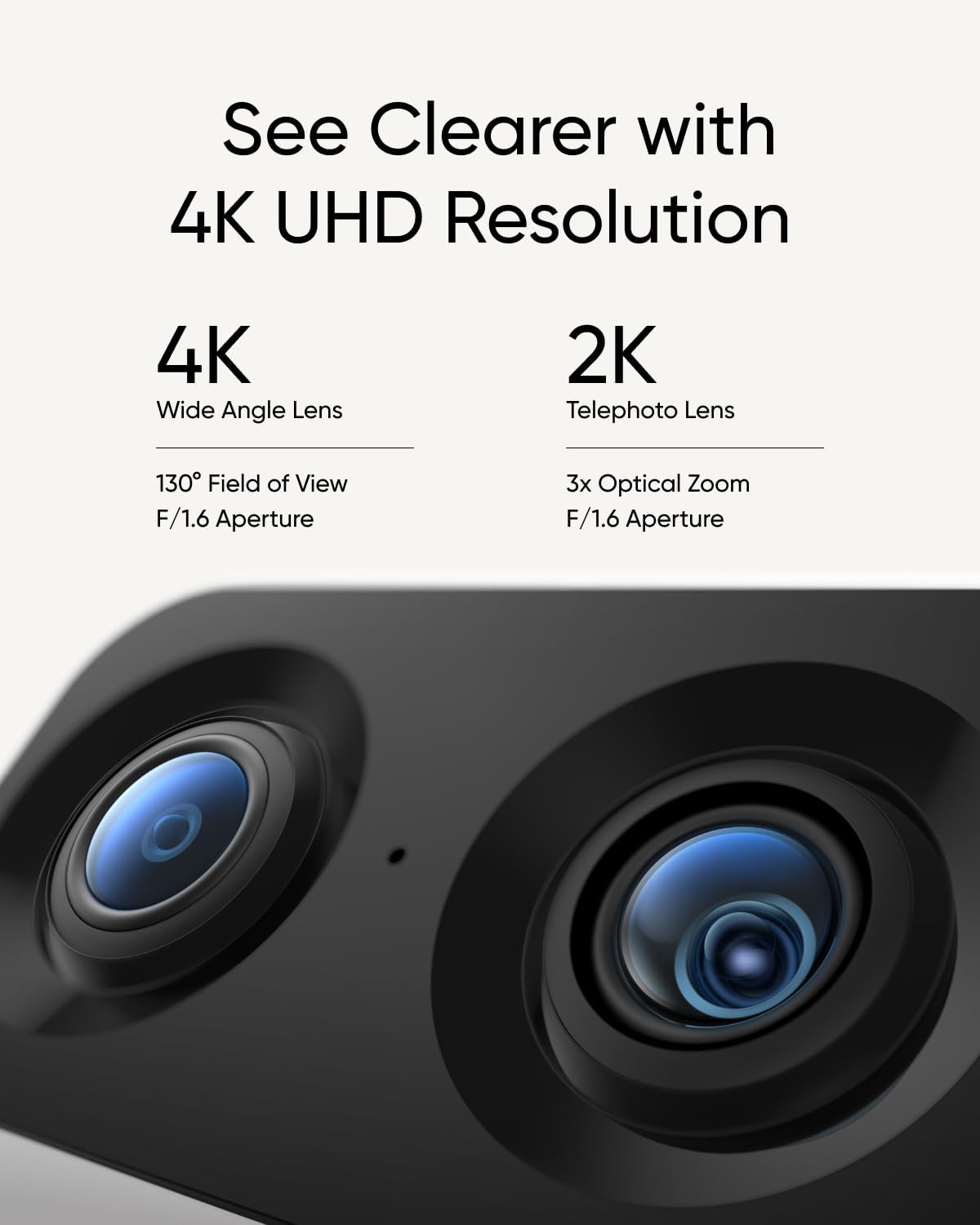
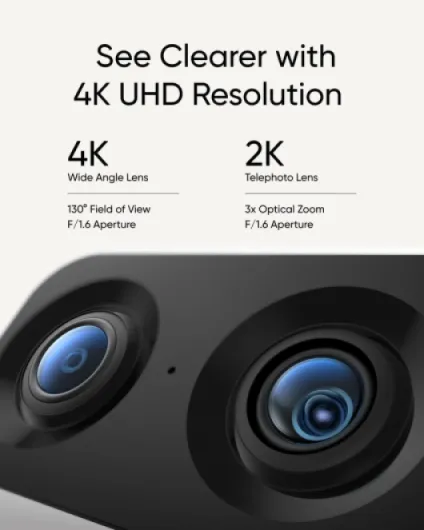
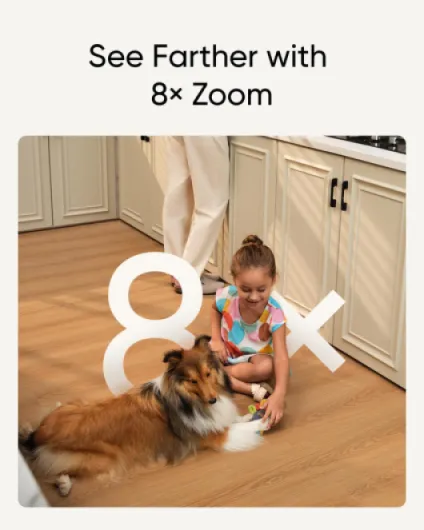
This is the part where the S350 clearly beats the cheap 1080p cameras I’ve used. Daytime image quality is very sharp. With decent light, the 4K wide lens gives you a clean view of the whole room and you can zoom in on details without everything turning into mush. I can pause a clip and read text on a cardboard box on the floor, or clearly see a license plate from my driveway when I tested it behind a window with street lighting. The hybrid 8× zoom is not magic, but it’s usable – you can zoom in pretty far before it gets too soft.
At night, the infrared night vision is also quite good. Faces and pets are still recognizable up to several meters away, and the camera doesn’t blow out white objects as much as some lower-end models. One important thing: if you put it behind glass (to look outside), IR is basically useless because it reflects on the window. In that case you need to turn IR off and rely on ambient light, like streetlights. With enough light outside, it still does a decent job, and motion detection for people and vehicles stays fairly accurate.
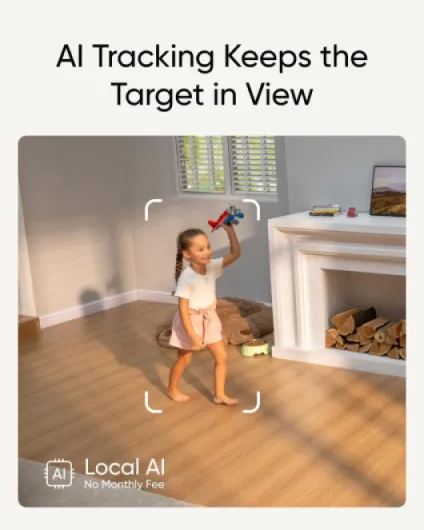
The AI tracking is a mix of very handy and occasionally annoying. When it works, it follows a person or pet smoothly as they move around the room, so you don’t have to keep swiping on the app. For pets, this is great – I can see my dog walk from his bed to the kitchen and back while I’m at work. But sometimes the camera over-rotates or recenters itself after a detection, which can be frustrating if you want it to stay fixed on a specific spot. You can tune a lot of this in the settings (tracking modes, return-to-position options), but it takes a bit of trial and error.
Notifications are fairly fast on a solid Wi‑Fi connection. On my 5 GHz network, I usually get motion alerts in a few seconds. The two-way audio is usable – there’s a slight delay, but nothing crazy. My dog reacts to my voice and calms down, which is the main thing I wanted. Compared to cheaper cams, the S350’s performance is a clear step up in image quality and tracking. It’s not perfect (especially if you try to use it as a full-blown outdoor camera through a window), but for indoor use it does the job well.
What this camera actually does in real life
On paper, the Eufy S350 is a dual-lens 4K indoor camera with 360° pan/tilt, 8× hybrid zoom, AI human/pet detection, sound detection, and local storage via microSD or HomeBase S380. In practice, that boils down to a camera that can sit on a shelf, look around an entire room, follow people or pets, and save clips without you paying a monthly fee. I tried it both as a pet cam in the living room and as a baby monitor in a nursery, switching modes in the app.
The dual-camera setup is not just a gimmick. You get one wide 4K lens that covers the whole room and another telephoto lens that gives you a closer, 2K-level zoom. In the app, you can view them together in a split view, which is surprisingly useful. For example, I leave the wide view to watch the whole living room while the telephoto is locked on the dog’s bed. When he gets up and walks around, the tracking usually keeps him in frame without me manually moving the camera.
The AI detection is one of the reasons it’s decent as a security cam. You can tell it to only alert for humans, or humans and pets, or general motion. Compared to cheaper cameras I’ve used, it does a better job at ignoring curtains and random light changes. It still sends the occasional useless alert, but nowhere near the constant spam I’ve had with some low-end cams. For pet monitoring, the sound detection and two-way audio are genuinely handy: when my dog starts whining after I leave, I get an alert, speak through the camera, and he usually calms down.
Overall, in day-to-day use, the S350 is good at three things: seeing a lot (360° coverage), seeing clearly (4K + zoom), and letting you check recordings without a subscription. If you’re expecting super tight outdoor-style security with perfect motion zones and zero fiddling, it’s not that. But as a multi-purpose indoor cam for pets, kids, or just keeping an eye on a room, it covers a lot of ground for the price.
As a pet cam, baby monitor and security cam – does it actually help?
I used the S350 in three real scenarios: watching my dog when I’m out, checking on a sleeping baby, and keeping an eye on the driveway through a window. It’s decent in all three, but clearly stronger for pets and general indoor monitoring than for serious driveway security. As a pet cam, it’s honestly one of the better ones I’ve tried. The pet detection works, the tracking is good enough, and being able to talk to the dog when he starts howling has helped a lot with separation anxiety. The app sends sound alerts when there’s barking or whining, which is actually useful, not just a gimmick.
As a baby monitor, it gets the job done but with some caveats. The video feed is much clearer than most regular baby monitors, and the night vision is good. You can also set up activity zones and sound alerts, so if the baby cries or moves a lot, you know. The downside is that the app is more complex than a simple baby monitor, and you’re relying on Wi‑Fi and phone battery. If your Wi‑Fi is flaky or you want something your parents can use without touching an app, this may feel a bit overkill. For tech-comfortable parents, though, it’s a solid option.
For security, it’s more of a strong indoor camera than a complete security system. Motion detection with human tagging is fairly reliable, and you can limit alerts to avoid going crazy with notifications. But like one of the Amazon reviewers said, if you want to catch absolutely everything, you’ll end up considering 24/7 recording to a HomeBase S380 with an SSD. That adds extra cost. As a single camera watching a room or entryway, it works well, but if your main goal is full coverage of a car outside, it’s workable but not ideal. It’s still an indoor camera first.
Overall, in terms of effectiveness, I’d say it does what it claims in a practical way: it lets you see clearly, track movement, and get useful alerts without paying a subscription. Just don’t expect it to magically replace a full multi-camera security setup or a dedicated standalone baby monitor for non-techy users.
Pros
- Very clear 4K image with useful 8× hybrid zoom and dual-lens split view
- No subscription required thanks to microSD and HomeBase S380 local storage options
- Effective pan/tilt and AI tracking for pets and people with decent night vision
Cons
- Mains powered only and Wi‑Fi only, so placement and network quality matter
- App and motion settings need tweaking; can be noisy with alerts out of the box
- Not ideal as a primary outdoor/driveway camera, especially behind glass with IR
Conclusion
Editor's rating
After using the Eufy Security Indoor Cam S350 daily, I’d describe it as a strong all-round indoor camera with a focus on image quality and flexibility rather than flashy gimmicks. The 4K resolution, dual lenses, and 360° pan/tilt actually matter in real use: you can see a whole room clearly, zoom in on details without everything turning into a blur, and let the camera follow people or pets around. For pet owners or anyone who wants a better-than-basic baby monitor, it’s a good fit, especially with the sound alerts and two-way audio.
The no-subscription approach is another big plus. Stick in a microSD card and you’re done – no monthly fees just to see your own clips. On the flip side, if you want full 24/7 coverage or to integrate it deeply into a bigger security setup, you’ll probably need a HomeBase S380 and an SSD, which adds cost and complexity. The camera is also not ideal as a main outdoor/driveway solution, especially through glass, and the app can feel a bit busy until you tweak all the settings to your liking.
If you want a simple, cheap indoor cam for occasional use, this might be more than you need. But if you’re looking for a clear, flexible camera for pets, kids, and general indoor security, and you don’t want a subscription, the S350 is a solid option. Just go in knowing it’s an indoor, mains-powered device that does its best work on a stable Wi‑Fi network and with a bit of setup time in the app.