
Summary
Editor's rating
Is the Tapo C575D worth the money?
Design and build: not pretty, but clearly built to live outside
Weather, wiring, and long‑term use
Image quality, tracking, and AI: where it actually earns its keep
What this camera actually offers in real life
Does it actually improve security day to day?
Pros
- Dual 4K lenses (wide + telephoto) give both broad coverage and usable detail on faces and plates
- PoE/Ethernet and IP66 build make it stable and suitable for long‑term outdoor use
- Free AI detection (people/vehicles/pets) and local storage mean no mandatory subscription costs
Cons
- Install requires drilling and running Ethernet or power, not ideal for absolute beginners
- Smart tracking can be inconsistent when multiple things move at once
- High‑resolution streaming needs a solid network and can be heavy on mobile data

Specifications
View full product page →| Brand | Tapo |
A dual‑lens 4K cam that’s not just marketing on the box
I’ve been using the Tapo C575D outside my house for a few weeks, mainly to watch the driveway and a bit of the street. I replaced a basic 1080p bullet camera with this, so I wasn’t expecting miracles, just something sharper with better coverage. In practice, the jump from a single cheap cam to this dual‑lens 4K setup is pretty obvious day to day. You see more, and you see it more clearly.
The big promise here is two 4K lenses: one ultra‑wide to see the whole scene, and one telephoto to zoom in on what matters. Add to that pan/tilt, AI detection (people, vehicles, pets), and no subscription required if you use a microSD or NVR. On paper it sounds like something only security nerds need, but honestly it’s fine for a normal homeowner who just wants to know who’s outside and what’s going on.
My use case is pretty standard: I want to know when someone walks up the drive, when a delivery arrives, and I want half‑decent evidence if something happens to the cars. Before this, I had constant false alerts from trees moving, cats, and headlights. With the C575D, I spent a bit of time tuning zones and AI detection, and after that, the alerts got a lot more useful and less annoying.
It’s not perfect. The app is good but not flawless, the pan/tilt tracking can be a bit slow or confused if there’s a lot going on, and 4K streams need a solid network. But compared to cheaper cams or some subscription‑heavy brands like Ring, it’s a pretty solid balance of features, control, and cost. If you’re okay pulling an Ethernet or power cable and drilling a few holes, it does the job well.
Is the Tapo C575D worth the money?
From a value for money point of view, the Tapo C575D sits in a sweet spot between cheap no‑name cams and expensive subscription‑heavy brands. You get dual 4K lenses, pan/tilt, AI detection, PoE, and solid build quality without being forced into a monthly cloud plan. If you already have a microSD card or an NVR/ NAS that supports RTSP/ONVIF, you’re basically done after the initial purchase.
Compared to something like a Ring or similar brands, the main difference is control vs convenience. With Ring, you pay for easy setup and a tight ecosystem but you’re locked into their subscription if you want recordings and better features. With the C575D, you pay a bit upfront in effort (running Ethernet, setting zones, maybe integrating with an NVR), but running costs are near zero. For someone who plans to keep the camera for several years, that adds up quickly in your favour.
There are cheaper 4K cams out there, but most of them cut corners somewhere: no decent AI, no pan/tilt, weaker night vision, or clunky apps full of ads. Here, the Tapo app is fairly clean, simple to use, and works well with other Tapo gear if you already have some. The 4.5/5 Amazon rating with a lot of reviews seems fair to me – it’s not flawless, but it’s a strong overall package for the price bracket.
If you’re on a tight budget and just need a basic outdoor cam, this might be overkill. A simple 1080p fixed lens could be enough. But if you care about detail (plates, faces), want to cover a wide area and zoom in without losing clarity, and don’t want to pay subscriptions, the C575D offers pretty solid value. You’re paying more than for a basic cam, but you’re getting noticeably more in return in daily use.

Design and build: not pretty, but clearly built to live outside
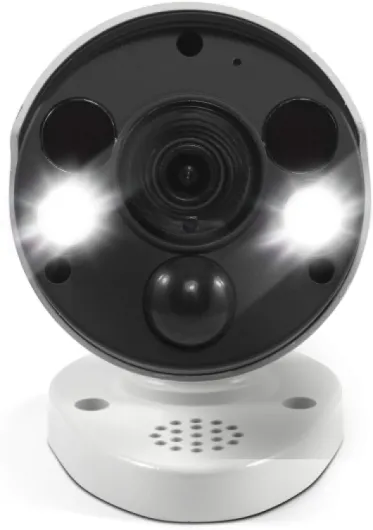
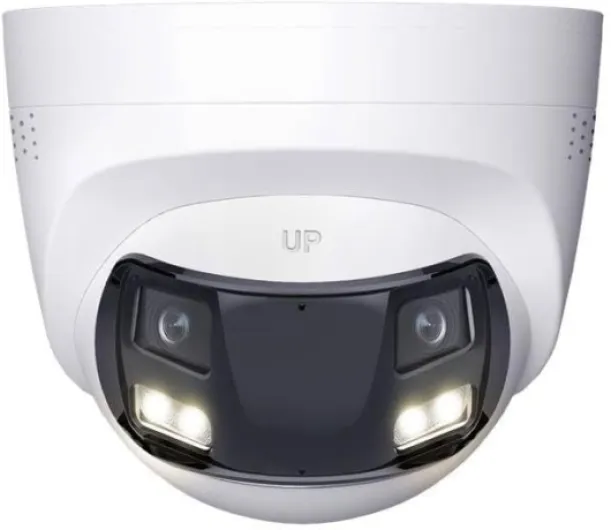
Physically, the Tapo C575D is not a tiny discreet camera. It’s a fairly chunky dome‑style pan/tilt unit with the two lenses visible on the front. If you’re looking for something that blends in like a small doorbell cam, this isn’t it. It looks more like proper CCTV, which honestly I don’t mind – it sends a clear message that the area is monitored. Mounted under my eaves, it’s visible but not ridiculous.
The IP66 rating is what matters more than looks. That means it’s dust‑tight and can handle heavy rain and rough weather. I’ve had it up through a couple of nasty storms, and there’s been no fogging, no water getting in, and no random reboots. The housing feels hard and solid, not like thin plastic that’ll crack in a year. The moving pan/tilt mechanism is quiet enough and hasn’t started grinding or sticking so far.
One nice detail: the way the camera is shaped, it doesn’t have a big “hood” where spiders love to build webs. That might sound minor, but anyone who’s used outdoor cameras knows how often you end up with a web right in front of the lens. Here, I’m getting fewer of those, or at least they’re not directly in front of the image. That’s a small but practical design win.
Mounting is straightforward but not tool‑free: screw‑in mount, ceiling or wall, and you need to plan where your cable comes through. You’ll be drilling at least one hole for the Ethernet/ power, plus 3 screws for the bracket. It’s not hard if you’re comfortable with basic DIY, but it’s not the kind of product you just stick on with tape. Overall, the design is functional and feels ready for long‑term outdoor use, but don’t expect it to disappear visually – it looks like a real security camera, for better or worse.
Weather, wiring, and long‑term use
This camera is clearly made to stay outside for years, not be taken down every few months. The IP66 rating is one thing on the spec sheet, but in real life, it has been through heavy rain and a couple of temperature swings without complaining. No water inside, no condensation on the lens, and no random reboots or connection drops. Compared to some flimsy Wi‑Fi cams I’ve used before, the C575D feels more like proper CCTV kit.
The fact that it runs on PoE or DC power over Ethernet is a big part of that durability. You’re not relying on a USB plug dangling out of a window or a random long adapter cable. Once you’ve run the Ethernet to a safe spot and fixed the camera properly, it just sits there and works. Wired Ethernet also means no Wi‑Fi dropouts when the router decides to act up or when the signal has to fight through thick walls. For long‑term reliability, wired is simply better, even if the initial install is a bit more effort.
The moving parts (pan/tilt) are usually the first thing to die on cheap PTZ cameras. So far, on the C575D, movement is still smooth and quiet, no grinding or hesitation. That said, this is something that only really shows after a year or more of use. Based on Tapo/TP‑Link gear I’ve had before (indoor cams, smart plugs, etc.), they tend to last reasonably well, so I’m not too worried, but I’d still avoid constantly spinning the camera around for no reason. Set a few key positions and let the smart tracking handle the rest.
In short, durability looks solid for the price. The housing feels robust, the cables and seals are decent, and the wired connection helps stability. If you’re in a place with harsh winters or hot summers, I’d still mount it in a spot with at least a bit of protection (under an eave, not fully exposed on a pole), but overall it gives the impression it can handle real‑world outdoor use without babying it.
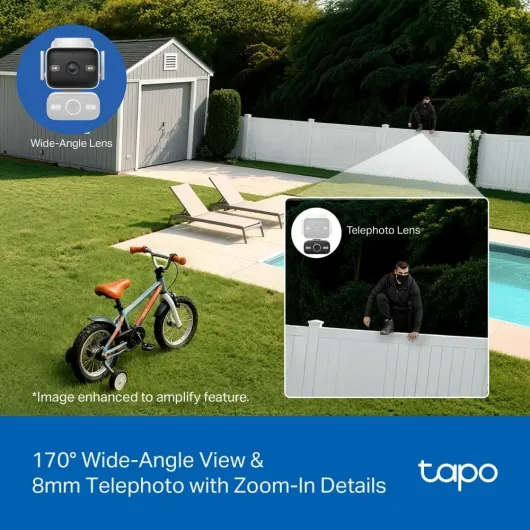
Image quality, tracking, and AI: where it actually earns its keep
The image quality is where the C575D justifies the 4K label. The wide lens gives a sharp, detailed overview, and the telephoto lens is genuinely useful instead of being a gimmick. Compared to my old 1080p cam, I can actually read number plates at a reasonable distance and recognise faces without zooming in until it’s all pixel soup. Daytime image is crisp, with decent colours and contrast – nothing cinematic, but absolutely fine for security.
At night, you have a few options: infrared black‑and‑white, full‑colour night mode, or smart mode that switches depending on conditions. In practice, the smart mode worked fine for me. If there’s enough ambient light (streetlights, neighbour’s porch, etc.), colour night vision looks clear and you can still pick out clothing colours and car colours. In pitch‑dark corners, it falls back to IR. The stated 30‑metre night vision range is roughly accurate in my setup – you can see shapes further out, but detail drops off past that.
The AI detection is decent but not perfect. People and vehicles are usually recognised correctly. I’ve had the odd cat flagged as a person and some headlights confusing the system, but it’s still far better than pure motion detection, which I turned off quickly because every tree movement set it off. Once I narrowed the activity zones to just my driveway and front walk, alerts became much more relevant. The free AI is a big plus compared to brands that lock this behind a subscription.
The pan/tilt and smart tracking are handy but not magic. When someone walks through the scene, the camera will try to follow them with the telephoto lens while keeping the wide shot. Sometimes it tracks smoothly; other times, if there’s more than one moving object, it gets a bit confused or slow. I wouldn’t rely on tracking alone; I treat it as a bonus. The one‑tap focus from the wide view to a specific area is the feature I use the most – tap the car or the gate in the app, and it quickly zooms in with the tele lens. Overall, performance is strong for the price bracket, with a few quirks you just learn to work around.
What this camera actually offers in real life
On paper, the Tapo C575D is a mouthful: dual 4K lenses, pan/tilt, 18× digital zoom, AI person/vehicle/pet detection, IP66 weatherproof, PoE or DC power, no mandatory subscription. In normal language, it’s a wired outdoor camera that can physically move, watch two areas at once (wide + zoomed), and tell the difference between a car and a cat most of the time. It plugs into your network via Ethernet, and all control goes through the Tapo app or whatever NVR/RTSP setup you use.
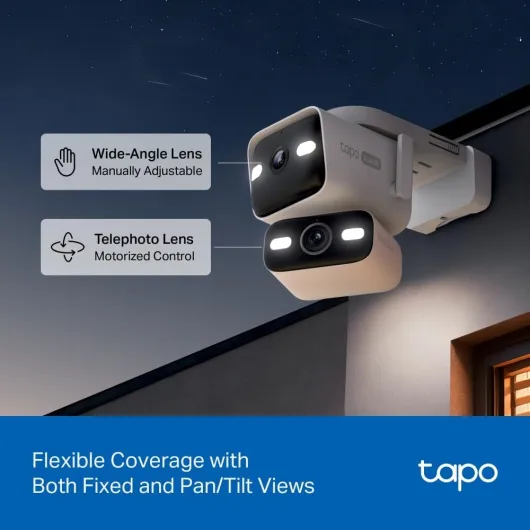
The dual‑lens setup is the main thing that separates it from a standard bullet camera. One lens is ultra‑wide (around 170°) so you see a big chunk of your property. The second lens is a telephoto that lets you zoom in on the gate, front door, or parked cars without the whole image turning into mushy pixels. In the app, you can see both views and quickly tap to focus on the area you care about. For me, I keep the wide view on the driveway and the telephoto aimed at the car doors and number plates.
The AI detection is another selling point. You can pick what it should react to: people, vehicles, pets, or just general motion. I turned off generic motion pretty quickly because it was too noisy, but with people and vehicles only, the alerts became usable. It’s not magic – I’ve had the odd cat flagged as a person and headlights confusing it – but overall, it’s a step up from dumb motion detection. And it’s nice that this is all included without a monthly fee.
In day‑to‑day use, the C575D feels like a more serious camera than the usual Wi‑Fi gadgets you slap under a gutter. PoE and Ethernet make the connection stable, and it’s clearly built with long‑term outdoor use in mind. If you just want a quick wireless stick‑on cam, this isn’t it. But if you’re okay doing a proper install and want something closer to a light NVR‑style setup, the feature list makes sense and is actually useful, not just buzzwords.
Does it actually improve security day to day?
In terms of real security impact, the C575D has done what I wanted: fewer useless alerts, better evidence if something happens, and easier checking when I’m away. Before this, my phone buzzed constantly every time wind hit the bushes. Now, with person and vehicle detection tuned and zones trimmed, I mostly get alerts only when someone walks up or a car enters the drive. That alone makes the camera feel more serious and less like a toy.
The two‑way audio is decent enough to shout at delivery drivers or ask a question, but don’t expect hi‑fi sound. There’s a bit of delay, and the speaker sounds like a typical outdoor cam speaker: loud enough to get attention, not pleasant. Still, it’s useful. I’ve used it to tell a courier where to leave a parcel and to tell a random door‑knocker I’m not interested, all while being away from home. The built‑in alarm and light options can also be set to trigger on certain events, which is more of a deterrent than anything else.
From a monitoring point of view, having the wide and zoomed views at the same time is genuinely practical. I keep the wide view to see if there’s anyone else hanging around or any suspicious car doing loops, and the zoom view shows the actual face or plate. When I was abroad, I checked the live view a few times over mobile data; the stream adapts, but 4K obviously eats more bandwidth, so you’ll sometimes end up on a lower‑quality live view if the connection is weak. Playback from the SD/NVR at home quality is much sharper.
Overall, the camera is effective as long as you’re willing to spend a bit of time on setup: drawing zones, picking which AI events matter, and positioning the camera properly. Out of the box with all motion alerts on, it’s noisy. After an evening of tweaking, it became a tool I actually rely on. It’s not bulletproof security, but for a home setup, it’s a big step up from cheap single‑lens 1080p cams.
Pros
- Dual 4K lenses (wide + telephoto) give both broad coverage and usable detail on faces and plates
- PoE/Ethernet and IP66 build make it stable and suitable for long‑term outdoor use
- Free AI detection (people/vehicles/pets) and local storage mean no mandatory subscription costs
Cons
- Install requires drilling and running Ethernet or power, not ideal for absolute beginners
- Smart tracking can be inconsistent when multiple things move at once
- High‑resolution streaming needs a solid network and can be heavy on mobile data
Conclusion
Editor's rating
The Tapo C575D is a solid outdoor security camera for people who actually want to cover a whole area properly and still see details. The dual 4K lenses and pan/tilt aren’t just buzzwords – they genuinely let you watch a wide scene and zoom in on what matters without everything turning into a blur. With decent AI detection, wired Ethernet, and IP66 build, it feels closer to a small CCTV setup than a casual Wi‑Fi gadget.
It’s not plug‑and‑play in the sense of a battery doorbell. You’ll need to drill, run Ethernet or power, and spend time in the app setting zones and AI filters. If that sounds like a chore and you just want something quick and simple, you might be happier with a basic wireless cam. But if you’re okay with a bit of DIY and want no‑nonsense, subscription‑free recording and better control over your system, the C575D is a strong option. It’s especially suited for driveways, gardens, and side alleys where you want both coverage and detail.
In short: good image quality, useful features, and fair price, with a few quirks on tracking and some setup effort required. If you’re building or upgrading a home security setup and prefer wired reliability over quick stick‑on gadgets, this camera is worth considering. If you just want a cheap, simple cam to occasionally check your front door, it’s probably more than you need.