Why ring camera mounting height matters more than the spec sheet
Most first time owners think any Ring camera mounted near the door is fine. In practice, the height you choose above the ground quietly decides whether you get a clear video of a visitor’s face or a blurry hint of a hoodie at the edge of the frame. When you understand how mounting height, viewing angle and distance interact, you turn a basic Ring doorbell or security camera into a far more reliable security tool.
Ring publishes different recommended heights for different models in its official installation guides. For example, many Ring Video Doorbell models are designed to be installed around 1.2 meters (about 48 inches) above the finished floor, while several Ring outdoor security cameras and floodlight units are rated for higher mounting positions. All of them use a motion detection zone that widens as it moves away from the lens, but the exact range and video quality depend on the model, the motion settings in the app and the mounting angle rather than a single fixed “cone.”
Because of that, there is no universal 2.7 meter rule from Ring for every device. Instead, Ring’s own support documentation generally suggests mounting doorbells lower, near chest height, and placing outdoor cameras and floodlights higher, often between about 2.4 and 3 meters (roughly 8 to 10 feet). At those heights, the motion detection zone from a typical Ring camera lines up with human sized objects along a normal front path, and a modest downward angle helps balance motion detection, identification and privacy better than a casual eye level install.
The 6 meter habit: what happens when you mount too low
Many people instinctively mount a Ring doorbell or Ring Stick Up Cam at eye level. That feels natural because you want the live view from the camera to match how you see the door, but it quietly sabotages motion detection and shortens your security perimeter. A low mounting position around 1.8 meters above the ground (about 6 feet) gives you nice close up video at the door yet often leaves the approach path only partly covered.
At roughly 1.8 meters, the motion detection zone from a Ring camera tends to skim just above the ground, so it may only start tracking people once they are very close to the door. You will still get alerts, but motion detection can trigger late, sometimes when a visitor is already reaching for the handle or covering the doorbell. In simple tests you can run yourself, clips from a low mounted Ring doorbell often start a second or two after movement begins, while a slightly higher camera on the same wifi network records a longer sequence of the approach.
There is another tradeoff with low mounting height that new homeowners rarely consider. A camera or doorbell mounted too low makes it easier for someone to tamper with the device, tilt the angle away from the door or even block the lens with a hand before motion fully registers. If you care about privacy and want to avoid filming the whole street, you can usually keep the ring camera mounting height higher and narrow the view using motion zones and privacy settings in the app instead of dragging the whole device down the wall.
For a deeper look at how intruders actually approach a property and which door they prefer, it is worth reading this analysis of where burglars really enter and how a Ring camera reads your house. That kind of context makes it easier to decide whether a slightly higher mount or a secondary camera near a side door will give better overall security.
The 12 meter temptation: when high mounting ruins identification
On many new houses, the easiest place to mount a Ring camera is under the gable or soffit. That spot can sit 3.5 meters or more above the ground (around 11 to 12 feet), which feels safe, weather protected and great for a wide view of the driveway. The problem is that a camera mounted that high often turns faces into foreheads and motion into vague shapes, especially at night when video quality already drops.
At around 3.5 meters, the motion detection zone from a Ring Floodlight Cam or Ring Stick Up Cam Battery can sweep a much larger area, so motion alerts may trigger earlier and at longer distances. You might see people at well over 10 meters, but the security value of that video for identification suffers because the lens is looking down at a steep angle. When you review clips from a high mounted camera, you often see caps, hairlines and shoulders instead of the kind of frontal view that police or insurance investigators actually need.
There is also a subtle wifi and privacy penalty with very high mounting. A camera or doorbell mounted near the roofline may sit farther from your router or mesh node, which can reduce video quality or cause motion clips to stutter just when security matters most. At the same time, the higher angle makes it easier to capture neighboring gardens or windows, so you will spend more time carving out privacy zones and less time getting clean footage of your own door and driveway.
If you are planning multiple devices, think in terms of complementary heights rather than one very high master camera. A Ring Floodlight Cam mounted high can watch the driveway and yard, while a Ring doorbell at a more moderate ring camera mounting height handles faces at the door. For room by room planning and to avoid blind spots indoors, this guide on where to point your Ring camera for full coverage is a useful next step.
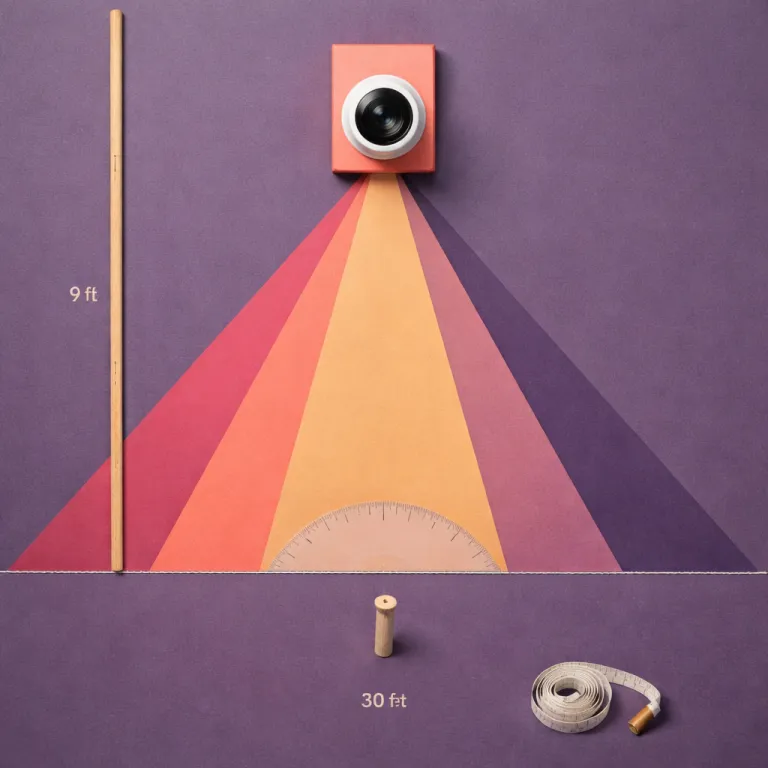
The 9 foot rule: angles, meters and a simple field test
For many homes, a practical sweet spot for an outdoor Ring security camera is a mounting height of about 2.4 to 2.7 meters (roughly 8 to 9 feet). At this height, the motion detection zone from a Ring camera or Ring doorbell usually lines up with human torsos between roughly 2 and 9 meters from the door, which is where most real world encounters happen. You still get a wide view of the approach path, but the angle is shallow enough to keep faces recognizable in the recorded video.
Once the camera is mounted around 2.7 meters, the next step is to adjust the downward angle. A Ring camera that sits high but points straight out will mostly see the horizon and upper bodies, so tilting it down by about 15 to 30 degrees brings the ground, the door mat and the first few meters of path into the frame. That modest angle change also helps motion detection, because the sensor reads movement across the frame rather than only at the very bottom edge.
There is a simple field test that works with almost any Ring model and does not require special tools. After you mount the camera and connect it to wifi, stand about 9 meters (around 30 feet) from the door and walk slowly toward the house to see when motion alerts trigger and how long the clip is. Then back up another 3 meters beyond that point and repeat the walk to check whether person detection still fires and whether the video quality is good enough to identify your own face in the saved recording.
To make those adjustments easier, you can use a quick reference table based on Ring’s general guidance and typical fields of view:
| Mounting height | Approx. tilt angle | Typical coverage zone* |
|---|---|---|
| 1.2 m / 4 ft (doorbells) | 0–15° down | Close range at the door, packages and visitors within ~2–5 m |
| 2.4 m / 8 ft | 15–25° down | Front path and driveway within ~3–9 m, good facial detail |
| 2.7–3 m / 9–10 ft | 20–30° down | Wider yard coverage up to ~10 m, slightly steeper view of faces |
*Exact detection distances and video coverage vary by Ring model and motion settings; always confirm with the spec sheet and a live field test.
If you want to understand how smarter motion analysis and familiar face handling affect what your camera records, this explainer on how new Ring AI recognition changes doorbell footage is worth reading before you lock in your final mounting angle. It will help you balance security, privacy and storage so that your camera works for you rather than just filling the cloud with clips of passing cars.
Real world placement tips for first time Ring owners
Start by mapping the exact area you want the camera to watch. For a front door, that usually means the first 3 to 9 meters of path, the doorstep itself and a slice of the street where visitors appear, not the whole neighborhood. Once you know that zone, you can choose a ring camera mounting height and viewing angle that frame it cleanly without wasting video on empty sky or distant traffic.
On a typical brick house, a Ring Video Doorbell works best when mounted about 1.2 meters from the door frame and around 1.2 meters above the step, which aligns with Ring’s own guidance for many doorbell models. You can then pair it with a secondary Ring camera at around 2.4 to 2.7 meters for wider motion coverage. That combination gives you a close range view for packages and a higher mounted overview for security, all while keeping wifi distances reasonable. If you only install one device, prioritize the higher mount and use the app’s live view to confirm that faces remain clear at the door.
Indoors, treat each camera like a doorway guard rather than a room monitor. Mounting a Ring camera too low on a shelf gives you a pet’s eye view, while placing it too high in a corner turns people into anonymous shapes crossing the floor. A moderate height around 2 to 2.3 meters with a slight downward angle usually balances privacy, motion detection and video quality for hallways and living rooms.
Remember that the best security setup is the one you can live with every day. If a particular mounting height makes you feel over watched in your own garden, raise or lower the camera a few centimeters and tighten the motion zones until the view feels right. In the end, what matters is not the megapixel count, but the clear, usable view from your porch at 2 a.m.
FAQ
What is the best mounting height for a Ring doorbell at a front door ?
For most front doors, the best mounting height for a Ring doorbell is around 1.2 meters above the step (about 48 inches), which aligns the lens with chest level and keeps faces centered in the frame. This is consistent with Ring’s own installation guidance for many Video Doorbell models, though you should always confirm the exact recommendation on the product’s spec sheet. If you pair the doorbell with a separate Ring security camera, mount that second device higher at about 2.4 to 2.7 meters to extend motion coverage along the path. This combination balances identification at the door with earlier motion alerts farther from the house.
How high should I mount a Ring Floodlight Cam over a driveway ?
A Ring Floodlight Cam usually performs best when mounted between about 2.7 and 3 meters above the ground (roughly 9 to 10 feet), centered over the driveway or slightly offset toward the main walking route. At this height, the motion sensor can track people and cars across the driveway while the video still captures usable facial detail near the garage door. Mounting much higher than roughly 3.5 meters tends to improve range but makes identification harder, especially at night when the viewing angle is steep.
Will a Ring camera work properly if it is mounted under the roofline ?
A Ring camera mounted under the roofline can still work, but you need to check both the angle and the wifi signal strength. If the device sits higher than about 3.5 meters, tilt it down sharply and run a field test by walking at different distances to confirm that motion alerts trigger reliably and that the video quality remains stable. You may also need a wifi extender or a Ring Chime Pro to keep the live view smooth and recorded clips free of glitches at that height.
How can I avoid filming my neighbors while keeping good security coverage ?
To protect privacy while maintaining security, start by choosing a ring camera mounting height that focuses on your own door, path and garden rather than the street. Then use the Ring app to set privacy zones that block windows, neighboring doors and shared spaces from the live view and recorded video. A slight downward angle at around 2.4 to 2.7 meters often helps keep the frame tight on your property and reduces the chance of capturing areas you do not want to monitor.
Does mounting height affect Ring camera battery life ?
Mounting height affects battery life indirectly by changing how often motion detection triggers. A camera mounted too low near a busy path or road may record constant motion from pets, children or passing cars, which drains the battery faster. A well chosen height around 2.4 to 2.7 meters with carefully tuned motion zones usually reduces false alerts, improves the quality of each saved video clip and extends the time between charges.