

Understanding the basics of cctv installation
Key Elements of Home CCTV Security
Before diving into camera installation, it’s important to understand what makes up a typical CCTV system for home security. CCTV stands for closed-circuit television, and it’s a surveillance system designed to monitor and record activity in and around your property. These systems can be as simple as a single security camera or as complex as a network of digital cameras connected to a video recorder and access control devices.
- Cameras: The core of any CCTV system. Options range from basic analog models to advanced digital security cameras with features like night vision and motion detection.
- Video Recorder: Stores footage for later review. Digital video recorders (DVR) and network video recorders (NVR) are common choices, depending on the type of cameras you install.
- Cabling and Power: Wired systems require cables for both power and video transmission. Ethernet cables are used for many digital systems, while some cameras need separate power cables. Wireless security cameras reduce cable clutter but still need a power source.
- Monitor: Allows you to view live or recorded footage. Many modern systems let you access video remotely via smartphone apps.
What to Consider Before Installation
When planning your CCTV installation, think about the areas you want to cover, potential blind spots, and whether you prefer a wired or wireless system. The layout of your home, available power outlets, and internet connectivity will influence your choices. Some homeowners opt for professional installation services, while others choose to install security cameras themselves for flexibility and cost savings.
It’s also wise to consider the future maintenance and troubleshooting of your system. A well-planned installation will make it easier to access cameras and cables for repairs or upgrades. If you ever need to remove a device, such as a Ring doorbell, following a step-by-step removal guide can help you avoid damaging your equipment or wiring.
Understanding these basics will set the foundation for choosing the right Ring camera, planning your placement strategies, and ensuring your surveillance system meets your security needs.
Choosing the right Ring camera for your needs
Factors to Consider Before Selecting Your Camera
Choosing the right Ring camera for your home security system is a crucial step in the overall CCTV installation process. The market offers a variety of security cameras, each designed for different needs and environments. Before making a decision, it's important to assess your property, security goals, and technical requirements.
- Coverage Areas: Identify which areas need surveillance. Entry points, driveways, and blind spots are common choices. The number of cameras required depends on the size and layout of your property.
- Indoor vs. Outdoor: Some cameras are built specifically for outdoor use and can withstand weather conditions, while others are designed for indoor monitoring.
- Wired or Wireless: Wireless security cameras offer flexible installation and are ideal if you want to avoid running cables. Wired systems, on the other hand, may provide more stable connections and do not rely on Wi-Fi strength.
- Power Source: Consider whether you prefer battery-powered cameras, which are easier to install, or those that require a constant power supply via cables or ethernet.
- Video Quality: Higher resolution cameras provide clearer images, which can be crucial for identifying faces or license plates. Digital video recorders (DVRs) or network video recorders (NVRs) are often used for storing footage in CCTV systems.
- Integration with Other Systems: Some Ring cameras can be integrated with access control, alarms, or other smart home devices, enhancing your overall security system.
Popular Ring Camera Options
Ring offers several models tailored to different installation scenarios. Here are some common types:
- Ring Video Doorbell: Combines a doorbell with a camera, ideal for monitoring front doors and communicating with visitors.
- Ring Stick Up Cam: Versatile for both indoor and outdoor use, available in wired, battery, or solar-powered versions.
- Ring Floodlight Cam: Features built-in lights and a siren, perfect for illuminating and securing larger outdoor areas.
- Ring Spotlight Cam: Compact and equipped with motion-activated lights, suitable for driveways or backyards.
Professional Installation vs. DIY
While many Ring cameras are designed for easy DIY installation, some homeowners prefer professional installation services for more complex CCTV systems. Professional installers can help with cable management, system integration, and optimal placement to avoid blind spots. If you choose to install security cameras yourself, make sure to follow the manufacturer’s guidelines for system installation and setup.
Connectivity and Troubleshooting
Reliable connectivity is essential for any surveillance system. Wireless security cameras depend on a strong Wi-Fi signal, while wired cameras may require ethernet cables for stable video transmission. If you encounter issues with your Ring camera’s connection, you can find practical solutions in this guide to troubleshooting Wi-Fi connection issues.
By carefully considering these factors, you can select the most suitable Ring camera for your home, ensuring a secure and effective CCTV security system that meets your needs.
Placement strategies for optimal coverage
Key factors for strategic camera placement
Getting the most from your CCTV installation depends heavily on where you position your security cameras. The right placement can make a significant difference in your surveillance system’s effectiveness, helping you avoid blind spots and maximize coverage. Here are some practical considerations to guide your camera installation:
- Entry points: Focus on main doors, back doors, and ground-floor windows. These are common access points for intruders and should be covered by your security system.
- Driveways and garages: Vehicles and tools are frequent targets. Installing a camera here can deter theft and provide clear video evidence if needed.
- Perimeter coverage: Position cameras to monitor your property’s boundaries, such as fences and gates. This helps you spot suspicious activity before it reaches your home.
- Common areas: Hallways, living rooms, and staircases are high-traffic zones. Placing cameras in these areas can help monitor movement inside your home.
- Blind spots: Walk around your property and identify areas not visible from windows or doors. Adjust your camera system to cover these hidden zones.
Balancing visibility and discretion
Visible cameras can act as a deterrent, but sometimes you may want a more discreet approach. Consider the balance between making your security cameras obvious to discourage intruders and keeping them subtle to avoid tampering. Wireless security cameras offer flexibility for placement, while wired systems may require careful planning for cable management and power sources.
Technical considerations for optimal performance
- Height and angle: Mount cameras at least 8-10 feet above the ground to prevent tampering and ensure a wide field of view.
- Lighting conditions: Avoid pointing cameras directly at bright lights or reflective surfaces. Choose locations with consistent lighting for clearer video footage.
- Connectivity: For digital and wireless security systems, ensure a strong Wi-Fi signal or reliable ethernet connection. Wired CCTV systems need accessible routes for cables and power.
- Weather protection: Outdoor cameras should be weatherproof and installed under eaves or protective covers to extend their lifespan.
For more in-depth advice on selecting the best camera for your property and ensuring your CCTV system installation meets your needs, check out this guide on choosing the right wired security camera for your home.
Privacy considerations and legal aspects
Respecting Privacy While Enhancing Security
When installing a CCTV system or a Ring camera, balancing home security with privacy is essential. Surveillance systems can deter crime and provide peace of mind, but improper use may raise concerns for neighbors or visitors. Understanding the boundaries of video monitoring helps you avoid legal issues and maintain trust in your community.
- Field of View: Position your security cameras so they monitor your property only. Avoid pointing cameras at public spaces or neighboring homes. This reduces the risk of privacy complaints and aligns with many local regulations.
- Audio Recording: Some digital camera systems record audio by default. In many regions, recording conversations without consent is restricted or illegal. Check your camera settings and local laws before enabling audio features.
- Data Protection: Secure your video footage with strong passwords and, if possible, enable two-factor authentication. Regularly update your camera system software to protect against unauthorized access. If you use cloud storage, review the provider’s privacy policy to understand how your data is handled.
- Signage and Notification: In some areas, it’s required to notify people that surveillance cameras are in use. Consider placing clear signs at entrances to inform visitors about your CCTV installation.
- Legal Compliance: Laws regarding CCTV security and video surveillance vary by location. Before you install security cameras, research your local regulations. This includes rules about camera placement, data retention, and sharing footage with third parties.
Best Practices for Responsible Surveillance
Responsible camera installation goes beyond technical setup. Whether you choose a wired system with ethernet cables or a wireless security camera, always consider the impact on others. Limit camera angles to avoid capturing areas outside your property, and regularly review your system to ensure compliance with privacy standards.
If you’re unsure about the legal aspects of CCTV systems, consulting a professional installation service can help you navigate complex regulations. They can also advise on optimal placement to minimize blind spots while respecting privacy boundaries.
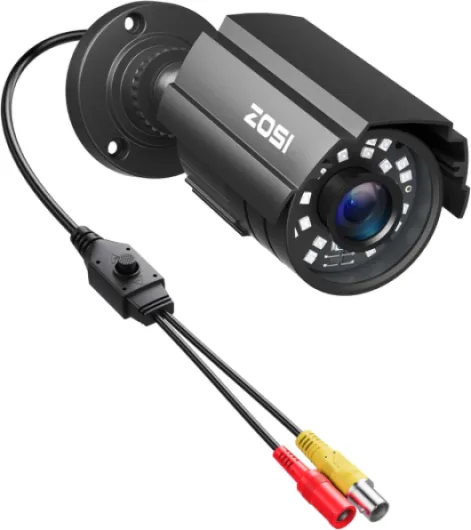
- + High Definition video quality
- + Versatile compatibility with multiple technologies (TVI/CVI/AHD/CVBS)
- + Night Vision capability
- + Waterproof metal housing for outdoor use
- + Suitable for various resolution systems (960H, 720P, 1080P, 5MP, 4K)

Step-by-step guide to installing your Ring camera
Preparing for a Smooth Installation
Before you start installing your Ring camera, gather all necessary tools and check that your chosen location has a stable Wi-Fi signal and access to power. If you’re using a wired security camera, make sure you have the right cables and that your power source is safe and accessible. For wireless security cameras, confirm your network can handle the video stream without interruption.Mounting Your Camera
Follow these steps for a straightforward camera installation:- Mark the mounting points on your wall or ceiling, ensuring you avoid blind spots and cover key areas of your property.
- Drill holes for the mounting screws, using anchors if installing on masonry or brick.
- Secure the camera bracket with screws, making sure it’s level and stable.
- Attach the camera to the bracket, adjusting the angle for optimal surveillance coverage.
Connecting Power and Network
- For wired cameras, connect the power cable and, if required, an ethernet cable for digital video transmission. Conceal cables where possible to protect them from weather and tampering.
- For wireless systems, follow the manufacturer’s instructions to connect your camera to your Wi-Fi network. Some Ring cameras use batteries, so ensure they are fully charged before installation.
Configuring Your Surveillance System
- Download the Ring app and follow the prompts to add your new camera to your security system.
- Set up motion zones and alerts to monitor specific areas and reduce unnecessary notifications.
- Test the live video feed and adjust the camera angle if needed for better coverage.
- If you’re integrating with a larger CCTV system or video recorder, ensure compatibility and proper access control settings.
When to Consider Professional Installation
If your installation involves multiple cameras, complex cable runs, or integration with existing CCTV systems, professional installation services can ensure your system is set up safely and efficiently. This is especially important for larger properties or when advanced access control is required. By following these steps, you can install cctv cameras and build a reliable security system tailored to your needs. Always refer to the product manual for specific instructions related to your Ring camera model.Maintaining and troubleshooting your Ring camera system
Regular Checks to Keep Your Camera System Reliable
Maintaining your Ring camera and overall CCTV system is essential for ongoing security. After installation, it’s important to check your cameras regularly to ensure they’re working as expected. This includes confirming that the video feed is clear, the power supply is stable, and there are no loose cables or connections. For wireless security cameras, verify that your Wi-Fi signal is strong in all monitored areas, and that your digital video recorder or cloud storage is capturing footage without gaps.
Common Troubleshooting Steps for Your Security Cameras
- Power issues: If your camera isn’t turning on, check the power cable and outlet. For battery-powered models, ensure the battery is charged and properly seated.
- Connectivity problems: If the camera drops offline, restart your router and camera. For wired systems, inspect the ethernet cables for damage or loose connections.
- Video quality concerns: Clean the camera lens regularly to avoid blurry footage. Adjust the camera angle if you notice blind spots or poor coverage in your surveillance system.
- Storage and access: Make sure your video recorder or cloud service has enough space. Regularly back up important footage and update your access control settings as needed.
When to Seek Professional Installation Services
If you encounter persistent issues with your CCTV installation, such as repeated system failures or complex wiring problems, it may be time to consult a professional. Certified technicians can assess your security system, replace faulty cables, and optimize camera placement to eliminate blind spots. They can also help with advanced integration, such as connecting your CCTV security cameras to a broader access control or digital surveillance system.
Routine Updates and System Upgrades
Keep your camera system’s firmware up to date to benefit from the latest security features and bug fixes. Manufacturers often release updates that improve system stability and add new capabilities. For larger CCTV systems, consider scheduling periodic reviews to determine if additional cameras or upgraded equipment are needed to maintain comprehensive coverage of all critical areas.